Skip to content
Buy — €35
CLAP · VST3 · AU · Windows & macOS

Four ducking stages.
One instance.

Multistage Sidechain builds the whole pump inside a single plugin: four serial envelopes whose gains multiply, ten editable curves, and kick-versus-bass phase alignment that reads what actually survives the duck.

Introductory price — first 3 weeks · normally €49 · instant delivery · 14-day refund

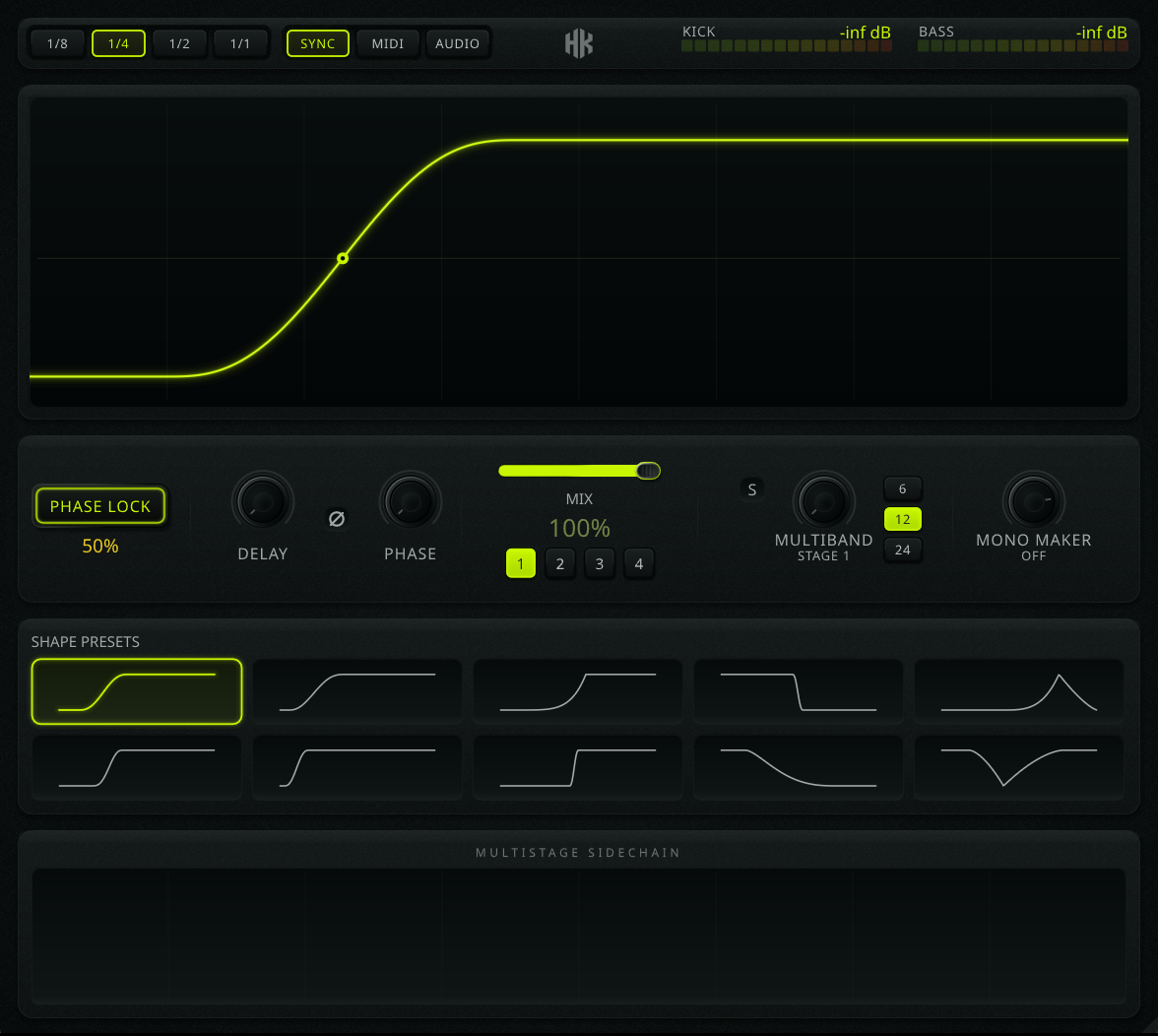
The Multistage Sidechain interface: four stage tabs, the envelope editor with kick and bass scopes, multiband and mono maker cards, and the phase alignment row.

This is the interface, not a picture of it. Pick a stage, load a curve, change the division, drag the depth. It answers.

One complex envelope usually costs you three plugins.

A deep pump on the downbeat. A shorter one on the offbeats. A quick dip that only touches the sub. Every sidechain plugin gives you exactly one envelope, so you stack instances, and now the depth you want lives in three windows, the CPU cost is tripled, and changing the groove means editing all of them in the right order.

Multistage Sidechain puts four of them in series inside one instance. Each stage has its own depth, note division and curve. The gains multiply: stage 1 sets the main pump, the rest refine it. You see the result while you build it.

Before

Sidechain, 1/4 deep

Sidechain, 1/8 shallow

Multiband, sub only

3 windows · 3 latencies · 3 undo stacks

After

Multistage Sidechain

4 stages · 1 window · 1 envelope

Drag inside the frame: the transition moves, the anchors do not.

Editing that never moves the endpoints.

Ten shapes, all editable. Drag the body of the curve to slide the transition earlier or later; drag the centre dot to bend the concavity from a hard snap to a slow swell.

The start and end anchors never move. Whatever you do to the middle, the curve still starts fully ducked and still returns to unity by the end of the cycle, so editing refines what you had instead of knocking it out of place. The drag is clamped to the range that actually moves that shape, so there is no dead travel at the edges.

Two of the ten run the other way (full level, then a cut to silence) for shortening sounds rather than ducking them.

Three ways to trigger it. One of them costs latency.

Sync

0 ms

Free-running against the host transport. Every stage locks to its own note division and stays locked when you loop, scrub or change tempo. Nothing to route.

MIDI

0 ms

Retriggered by note-ons, sample-accurate. Draw the ducking pattern as MIDI when the groove is not a straight division: swing, triplets, a dropped beat.

Audio

8 ms

Transient detection on the sidechain input. A band-pass isolates the kick's punch from the sub and the hats, and the detector re-primes between hits, so rolls and fills retrigger as reliably as a four-on-the-floor.

The main signal is delayed so the duck's attack spans the lookahead and full ducking lands exactly on the hit rather than after it. That 8 ms is reported to the host and compensated. Sync and MIDI stay at zero: the modes you will use most are not charged latency for a feature they never call.

Duck the sub. Leave the body alone.

Stage 1 can be band-limited on its own while stages 2–4 keep working across the full range. Set the crossover between 20 and 250 Hz, pick a 6, 12 or 24 dB/oct slope, and solo the low band to hear exactly what you are removing.

Ducked band Untouched

A centred low end, at the end of the chain.

Mono Maker folds everything below a frequency you choose down to mono, applied to the final output after every stage. It keeps the sub anchored and the club system happy while the rest of the sound stays as wide as you wrote it. Set it to zero to switch it off.

Mono below Stereo above

Phase alignment that reads the bass after the duck.

Every other aligner correlates your kick against the raw bass. But you just spent four stages removing the bass from underneath the kick, so it optimises a collision that no longer exists.

Multistage Sidechain correlates the kick against the processed bass, the signal coming out of all four stages. The only place the two really meet is the handoff, where the kick decays as the sub swells back in, and that is the region it solves for.

One click sets sub-sample delay and polarity, and reports how sure it is. It applies a correction rather than an absolute, so clicking again refines instead of starting over. Broadband phase rotation is there when you want to finish it by hand.

  • Sub-sample delay: 0–20 ms, interpolated, not rounded to the nearest sample.
  • Phase rotation: 0–360° broadband, magnitude untouched.
  • Align score & confidence: live readouts, red out of phase, green locked.

See how much bass survives.

Peak-hold meters for the incoming kick and the processed bass, in discrete segments rather than a bar, legible at silence, and you can see where the red starts before you ever reach it. Click a meter to reset the hold.

Behind the curve, high-resolution scopes of the kick and the processed bass, locked to the trigger cycle so they hold still instead of scrolling past. The analysis panel at the bottom shows the same two signals overlaid: how much bass is left, and whether it still collides with the kick.

Kick −3.2 dB
Bass −8.6 dB

What you are installing.

Formats
CLAP, VST3 and Audio Unit, 64-bit. All three are installed side by side; load whichever your host prefers. The Audio Unit is the one Logic and GarageBand read — they load no other format. The macOS build is universal, so the same file runs natively on Intel and Apple Silicon.
System
Windows 10 / 11 · macOS 10.13+ · 64-bit
Hosts
Any DAW that loads CLAP, VST3 or Audio Unit: Ableton Live, Logic Pro, FL Studio, Bitwig, Reaper, Studio One, Cubase, GarageBand and others.
Latency
Zero in Sync and MIDI. 8 ms in Audio mode, reported to the host for compensation.
Interface
1240 × 890, resizable
Licence
One purchase, up to 3 machines. Activate once online, then it verifies offline on every start, with no dongle, no account and no phoning home while you work.
Version
0.1.0

Introductory price — first 3 weeks

€35 €49

One-time payment. No subscription.

Buy Multistage Sidechain

Secure checkout by Lemon Squeezy · VAT calculated at checkout · licence delivered by email in seconds

  • CLAP, VST3 and AU — Windows and macOS
  • Licence for up to 3 of your own machines
  • Free updates across the 1.x series
  • Email support direct from the developer, no ticket queue
  • 14-day refund, no questions asked. If it does not fit your workflow, write and you get your money back

Windows and macOS. Check the specifications before you buy, and read the manual, which is public, so you know exactly what you are getting.

Before you buy.

Is there a demo version?

Not yet. There is no trial build at the moment. Instead there is a 14-day refund with no questions asked: buy it, put it on a real session, and if it is not what you expected, email support@hakunaaudio.com and you get your money back. The full manual is public so you can read exactly what every control does before spending anything.

Which DAWs does it work in?

Any host that loads CLAP, VST3 or Audio Unit. It has been developed and tested primarily in Ableton Live. Logic and GarageBand read only Audio Units, which is why that build exists; all three are installed, so you can pick whichever your host prefers.

Do I have to use all four stages?

No. A disabled stage is a straight bypass. Use one stage and it behaves like a normal sidechain shaper; turn on the others when the groove needs them.

How does activation work? Does it need to be online?

You activate once with the serial that arrives by email. After that the licence is stored on your machine and verified locally at every start, offline, with no account and no background connection. Studio machines that never see the internet are fine after the first activation.

Will the 8 ms of lookahead push my track out of time?

No. The latency is reported to the host, which compensates it like any other lookahead device. It only exists in Audio mode; Sync and MIDI report zero, so nothing is delayed unless you are using transient detection.

Do I get an invoice? What about VAT?

Checkout is handled by Lemon Squeezy as merchant of record. VAT is calculated for your country at checkout, an invoice is emailed automatically, and you can enter a business VAT number if you have one.

Something not answered here? Email me directly. It goes to the person who wrote the plugin.